Warning: sem_get() [function.sem-get]: failed for key 0x152b: Permission denied in /home/dossy/htdocs/wp/wp-content/plugins/wp-cache/wp-cache-phase2.php on line 98
Dossy's Blog: Tcl

Archive for the 'Tcl' Category

Getting ActiveState’s “teacup” working on MacOS X

Wednesday, October 21st, 2009

ActiveState has created a Tcl Extension Archive tool called teacup which simplifies the installation of binary extensions to Tcl. It’s included with ActiveTcl, but if you’re using Tcl from MacPorts and want to use teacup, it’s fairly easy:

1. Download teacup for MacOS X

The teacup binary can be downloaded from this location:

Here is a direct link to the latest teacup binary. The file is named file.exe — simply rename that to teacup and put it in /usr/local/bin or another convenient place in your $PATH.

2. Create the installation repository

You will need an installation repository where teacup can store its data locally. The default location is /Library/Tcl/teapot and you can create it like this:

$ sudo teacup create
Repository @ /Library/Tcl/teapot
    Created

3. Patch MacPorts tclsh to handle teapot repositories

$ sudo teacup setup /opt/local/bin/tclsh
Looking at tcl shell /opt/local/bin/tclsh ...
  Already able to handle Tcl Modules.
  Already has the platform packages.
  Patching: Adding code to handle teapot repositories ...
Done

4. Link teacup to MacPorts tclsh

$ sudo teacup link make /Library/Tcl/teapot /opt/local/bin/tclsh
Ok

That’s it! You’re done. You should now be able to list available packages within TEA using teacup list and install them using sudo teacup install "packagename".

I’ve tested this on MacOS X 10.6.1 Snow Leopard with Tcl 8.5.7 from MacPorts.

Tags: , , , ,

AOLserver in Google’s Summer of Code 2009

Friday, March 27th, 2009
Google Summer of Code 2009

Are you a student that meets Google’s eligibility criteria, who is interested in contributing to an Open Source project this summer? Google’s Summer of Code 2009 is on, and once again, the Tcl community has been accepted as a mentoring organization, which includes AOLserver.

Students can apply until the deadline of 19:00 UTC on April 3rd. If you have any questions about GSoC or AOLserver’s involvement in it, please ask me! I’ll try to help answer whatever questions you might have.

Good luck to all the students and mentoring organizations this summer!

Tags: , , ,

A simple “google for” Tcl script

Monday, November 24th, 2008

I make extensive use of Google throughout the day and I’ve always got “g” set up as the keyword for a Quick Search in Firefox. However, I also spend a lot of time at shell prompts, and sometimes I don’t want to bounce to a browser just to Google for something.

So, tonight, I wrote a small Tcl script that lets me “google for” at the prompt. Just save the previous link and rename it to “google” and move it somewhere in your PATH like /usr/local/bin, then make it executable with chmod 755.

The script requires Tcl with tDOM installed, as well as Tidy–both of these things are installed out-of-the-box on MacOS X 10.5 Leopard.

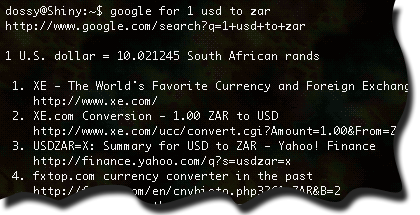
Once you get the script installed, you can do something like this:

'google for' screenshot

If you notice, for Google search queries that have a special result like the one above, the script displays it separately before the results. The script also emits the search query URL so you can just Control-click on it in Terminal and then select “Open URL” and have it pop up in your browser, which also works for any of the search result URLs.

I don’t know if anyone else would find this script useful, but it’s already saved me a ton of time–especially when I’m on a slow 64 kb/s GPRS connection like I am this evening. Either way, I’m releasing this script into the public domain.

Tags: , ,

Tcl is alive and well with Tcl 8.5

Tuesday, January 15th, 2008

Tcl logo

As much as people wonder “who still uses Tcl?” or “what the heck is Tcl?” … it’s still alive and well and under steady new development. The long-awaited release of Tcl 8.5 happened this past December 20, 2007. You can download it from here.

The discussion on Slashdot about it shows that there’s still a lot of misinformation and outright FUD being spread about Tcl, now 20 years old. Of course, the Tcl community seems to focus more on excellence in engineering than evangelism and PR, so Tcl will likely remain “a well-kept secret, sitting out in plain sight” for the next 20 years.

For people who are already familiar with Tcl but would like to know what significant changes were introduced in Tcl 8.5, Michael Cleverly has a fantastic write-up on it. I highly recommend reading what he wrote if you’re looking to take advantage of Tcl 8.5’s new features.

Tags:

A simple MySQL client in Tcl/Tk using mysqltcl

Friday, October 5th, 2007

Yesterday, Ron Cripe emailed me asking if I knew of any simple examples of how to use Tcl/Tk with MySQL. I knew about mysqltcl and pointed him in that direction, but he said he needed an actual example on how to use it.

I’ve done a lot of Tcl programming but have mostly avoided doing GUI’s with Tk, so I figured this might be a good opportunity to do some learning, myself. I quickly wrote a simple application that connects to a MySQL database, then lets you execute queries against it and displays the results. You can download it here:

It’s named .txt to make it easier to download–just rename it to only .tcl (removing the .txt) once you’ve saved it.

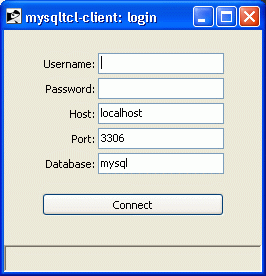
When you start the app, it presents you with a simple login dialog:

mysqltcl-client login dialog

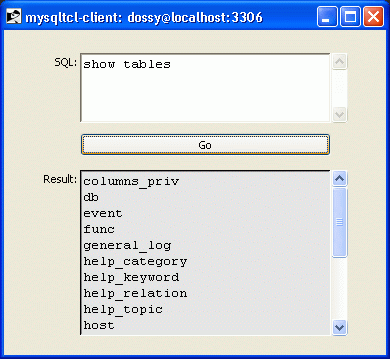
Enter your username and password, change the host, port and database values if necessary, and press Enter or click the Connect button. If all goes well, the login dialog will go away and the query window will appear:

mysqltcl-client query dialog

This is an example of what the query dialog looks like after executing a SHOW TABLES query. Very simple, not terribly exciting, but what do you want for a 5KB, 181-line Tcl script?

If you have Tcl, Tk and mysqltcl installed, go ahead and grab a copy of this script and check it out. If you have questions about the code, just ask: I’ll try my best to answer them.

Tags: , , , ,


Warning: sem_acquire(): supplied argument is not a valid SysV semaphore resource in /home/dossy/htdocs/wp/wp-content/plugins/wp-cache/wp-cache-phase2.php on line 107

Warning: sem_release(): supplied argument is not a valid SysV semaphore resource in /home/dossy/htdocs/wp/wp-content/plugins/wp-cache/wp-cache-phase2.php on line 116