Archives for 2008

del.icio.us/dossy links since May 12, 2008 at 09:00 AM

del.icio.us/dossy (RSS) links since May 12, 2008 at 09:00 AM:

Migrating from VirtualBox to VMware

As part of the Gnash buildbot farm, I run several virtual machines as build slaves. I started with VirtualBox because it is free software and I prefer to support free software, but it’s still a bit too fragile and it still lacks x86_64 guest support.

When I discovered that VMware Server is now available for free–well, free as in beer, anyway–I happily installed it and set up some new VMs on it. Best of all, it supports x86_64 guests! Of course, now I have the problem of migrating those VirtualBox guest VMs over to VMware.

VMware uses its own VMDK format for storing virtual disk images, while VirtualBox uses its own VDI format. The first step is getting a copy of vditool, VirtualBox’s command line program for manipulating VDI files.

The host OS I used to run VirtualBox is Ubuntu‘s 8.04 Hardy Heron on AMD64. The VirtualBox 1.6.0 .deb package didn’t include vditool, for some reason. Fortunately, the VirtualBox package in Debian’s “lenny” release includes it, so lets just grab it from there.

$ wget http://http.us.debian.org/debian/pool/main/v/virtualbox-ose/virtualbox-ose_1.5.6-dfsg-6_amd64.deb
$ dpkg -x virtualbox-ose_1.5.6-dfsg-6_amd64.deb vbox-1.5.6
$ sudo cp vbox-1.5.6/usr/lib/virtualbox/vditool /usr/lib/virtualbox/vditool
$ sudo ln -sf /usr/lib/virtualbox/vditool /usr/bin/vditool

There, now we have vditool installed. Next, we use it to export our old VirtualBox VDI back to raw disk data. However, if you used VirtualBox’s “Snapshots” with differencing VDI’s, you need to discard all snapshots before the one you want to write out as the raw disk: only the “base” data gets written out, not the “Current State”.

$ cd ~/.VirtualBox/VDI
$ vditool copydd win2000-i386-32gb.vdi win2000-i386-32gb.dd
vditool    Copyright (c) 2004-2008 innotek GmbH.

Copying VDI image file="win2000-i386-32gb.vdi" to DD file="win2000-i386-32gb.dd"...
The operation completed successfully!

Be careful, this could consume a lot of disk space, if you were using compacted VDI’s instead of fixed size as the raw image will be the full size of the disk image, which in my case was 32 GB even though the VDI only took ~6.5 GB on disk.

Once we have the raw data, we can create the VMDK metadata for our DD image. We compute the size of the raw data in sectors by dividing its size in bytes by 512:

$ stat --printf="%s 512/p" win2000-i386-32gb.dd | dc
67108864

We also need to compute the CHS geometry of the virtual disk. I used the assumption of 255 heads and 63 sectors:

$ stat --printf="%s 512/255/63/p" win2000-i386-32gb.dd | dc
4177

Once we have that information, we go ahead and create the VMDK metadata. Change the elements highlighted in blue as appropriate for your system:

$ cat >win2000-i386-32gb-flat.vmdk <<-__EOF__
# Disk DescriptorFile
version=1
CID=4dd210c6
parentCID=ffffffff
createType="monolithicFlat"

# Extent description
RW 67108864 FLAT "win2000-i386-32gb.dd" 0

# The Disk Data Base
#DDB

ddb.virtualHWVersion = "4"
ddb.geometry.cylinders = "4177"
ddb.geometry.heads = "255"
ddb.geometry.sectors = "63"
ddb.adapterType = "buslogic"
__EOF__

There, we now have a VMDK suitable for use in VMware! But, it takes up all 32 GB of space on the disk while only ~6.5 GB is actually in use. Lets use vmware-vdiskmanager to create another VMDK that is growable, instead:

$ vmware-vdiskmanager -r win2000-i386-32gb-flat.vmdk -t 0 win2000-i386-32gb.vmdk
Using log file /tmp/vmware-dossy/vdiskmanager.log
Creating a monolithic growable disk 'win2000-i386-32gb.vmdk'
  Convert: 100% done.
Virtual disk conversion successful.

And there you have it: a growable converted VMDK from VDI:

$ ls -lh win2000-i386-32gb*
-rw------- 1 dossy dossy  32G 2008-05-23 11:26 win2000-i386-32gb.dd
-rw------- 1 dossy dossy  327 2008-05-23 13:40 win2000-i386-32gb-flat.vmdk
-rw------- 1 dossy dossy 6.5G 2008-05-23 14:25 win2000-i386-32gb.vdi
-rw------- 1 dossy dossy 6.3G 2008-05-23 14:20 win2000-i386-32gb.vmdk

From here, I created a new virtual machine under VMware Server, specifying “Custom” and using an existing virtual disk–the one I just created.

Of course, I couldn’t just boot this VM up because the virtualized hardware from VirtualBox differs from the virtualized hardware in VMware, and the particular VM in question is a Microsoft Windows 2000 guest. To fix the Windows install, I performed a “repair installation” of Windows 2000. I guess this is necessary when you change all the hardware out from underneath a Windows machine. After completing the repair installation, the VM booted up! I went ahead and installed VMware Tools, rebooted, and now everything works as expected.

I don’t know how many folks out there want to migrate away from VirtualBox to VMware, but I couldn’t find very much useful information on doing it so hopefully this will help people out who want to do it.

Tags: , ,

TypeRacer, massively multiplayer online typing!

(Okay, perhaps it’s not yet “massively multiplayer” but, it could be!)

My latest distraction is a fun web based “game” called TypeRacer, where you “race” against other typists in realtime who are all typing the same text which is often a quote from a book or song lyrics.

I love typing speed measurement games and TypeRacer’s social software aspect and multi-player nature really sets this apart. I’m also a huge fan of educational online gaming. It would be nice to select passages from educational texts to type against your friends–learn something while having fun typing.

I’ve wondered whether there’s truly a better keyboard layout than QWERTY before and have yet to find any solid scientific proof. If Dvorak was measurably better than QWERTY, I would have expected to see two “bands” of scoring on TypeRacer: one of the varied QWERTY-layout typists, and a “break-away” group with speeds far above the rest who are master Dvorak-layout typists.

Either way, I guess I’m going to take a moment to fluff my ego:

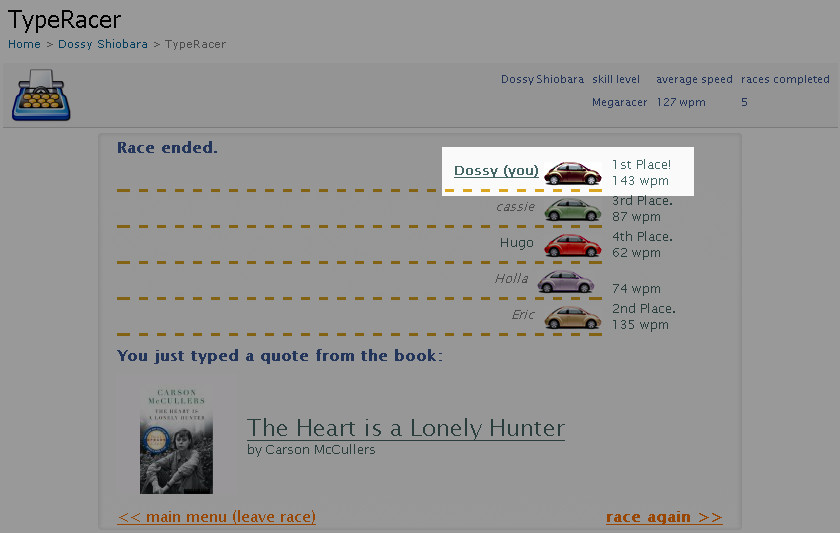
TypeRacer screenshot, 143 WPM!
(Click for full screenshot.)

Yes, that’s for real: 143 WPM. As you can see from the larger screenshot, my average speed over the past 5 races is 127 WPM. I know that over time, the average will regress to between 110-120 WPM, but for now, I’m going to enjoy this while it lasts. :-)

Think you can beat me? Lets set up a type-off and see who’s got the fingers of fury! Bring it on!

Tags: , ,

Why do you read this blog?

I’ve always wanted to blog about more personal things but always wondered who would bother to read it or even care. I’ve tried to stick to more technical subjects that might be useful and looking at my web traffic, this has definitely worked out. But, looking at the 160-odd subscribers to my blog makes it clear that there aren’t many people who care to read it regularly enough to subscribe to it.

But, there still are 160 or so out there, who have subscribed. I’d like to ask you: why? Do we know each other? Are you generally curious about me? Are you hoping I’ll post something useful for you and you don’t want to miss it?

I really want to know. Either leave a comment on this entry, or email me or catch me on IM and lets talk.

del.icio.us/dossy links since May 5, 2008 at 09:00 AM

del.icio.us/dossy (RSS) links since May 5, 2008 at 09:00 AM:

Marvell SysKonnect Yukon 2 drivers not usable in Ubuntu Hardy

I set out to build myself a new desktop and HTPC. I chose a Ultra Black MicroFly case to put everything in. There are a lot of mATX boards out now, so I decided to try an EVGA e-7100/630i board ($60 at Amazon.com), as I have no experience with them and love to try new stuff.

I typically don’t install removable media (floppy, CD-ROM/DVD-ROM, etc.) in my machines. I use external DVD writers, and everything is networked so I just rip ISOs and access them over the network if need be. So, typically when I set up a new machine, I netboot it to start the OS install. This is where I ran into my first hurdle with the EVGA board–it can’t netboot using the on-board NIC. It supports booting off “Legacy LAN” but I didn’t have a spare PCI ethernet card handy to slap in it. Luckily, it can also boot off USB devices, so I just made a Ubuntu Live USB image of Hardy AMD64 and used that to kickstart the OS install.

After I completed the initial Ubuntu install, I went to pull down any updates using apt-get, and the machine locked up hard. I repeated this a few times and each time, it would lock up requiring a physical reboot. Curious as to what was going on, I looked at lspci to see what hardware was on this board. Sadly, I found this:

03:00.0 Ethernet controller: Marvell Technology Group Ltd. 88E8056 PCI-E Gigabit Ethernet Controller (rev 14)

Aww, crap. Not another Marvell piece of crap. Only recently I dealt with an Intel DP35DPM board that had a Marvell 88SE6101 PATA IDE chip. When I say “support for Marvell chips under Linux is poor,” that’s being very kind. I was able to find this thread on kerneltrap.org where folks complained about the Marvell Yukon support in Linux as far back as September 2006 through April 2008.

Unfortunately, the sky2 module that ships with Ubuntu Hardy still doesn’t work completely. In dmesg output, I see:

[   39.437272] sky2 eth0: Link is up at 100 Mbps, full duplex, flow control both
[   43.785585] eth0: no IPv6 routers present
[  430.085997] sky2 eth0: rx error, status 0x740002 length 116
[  430.372344] sky2 eth0: rx error, status 0x780002 length 120
[  430.374110] sky2 eth0: rx error, status 0x760002 length 118
[  430.544242] sky2 eth0: rx error, status 0x760002 length 118
[  431.856916] sky2 eth0: rx error, status 0x700002 length 112
[  431.861653] sky2 eth0: rx error, status 0x740002 length 116
[  432.072037] sky2 eth0: rx error, status 0x520002 length 82
[  437.143385] sky2 eth0: rx error, status 0x4a0002 length 74
[  437.989254] sky2 eth0: rx error, status 0x560002 length 86
[  438.736323] sky2 eth0: rx error, status 0x520002 length 82
[  438.769120] sky2 eth0: rx error, status 0x740002 length 116
...

This results in corrupted packets in user space. It’s probably the cause of the hard lock-ups I had been experiencing: if I avoid using the network, the machine runs just fine and doesn’t hang!

I’m going to pick up another PCI ethernet card and disable the on-board NIC until the Marvell drivers are usable. It’s really a pity to have do it, but the board is essentially unusable with Linux because of the Marvell NIC.

Throughout all of this, I had asked EVGA customer support various questions via their online support web form, and was seriously impressed by their fast response time, usually within minutes! Even though I’m disappointed by the product’s poor on-board NIC, their friendly and responsive support definitely makes it an attractive company to do business with. If you have a problem with an EVGA product, I highly recommend you try contacting their customer support to see if they can help.

Tags: , ,

del.icio.us/dossy links since April 28, 2008 at 09:00 AM

del.icio.us/dossy (RSS) links since April 28, 2008 at 09:00 AM:

Show me some Twitter API enhancements, baby

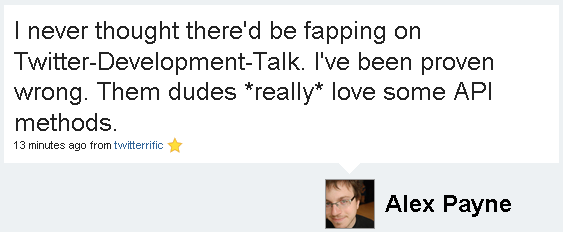
@al3x tweets: I never thought there'd be fapping on Twitter-Development-Talk. I've been proven wrong. Them dudes *really* love some API methods.

Heh.

Tags:

del.icio.us/dossy links since April 21, 2008 at 09:00 AM

del.icio.us/dossy (RSS) links since April 21, 2008 at 09:00 AM:

Yossi Kreinin praises Tcl and so should you!

Yossi Kreinin writes a very fair and positive blog entry about why he can’t believe he’s praising Tcl. In response, I left this comment on his blog:

I’m so glad you’ve put aside language bigotry and evaluated Tcl fairly–when you do, it’s easy to see how convenient it can be for some tasks.

Of course I’m biased, but I also think Tcl is a fantastic language for developing web applications-thus, my affinity for AOLserver.

When you reduce web development to the simple process of “consume bits from a data source, transform strings, output bits to a network socket” … Tcl’s simplicity really makes rapid development a breeze, coupled with AOLserver’s library of Tcl procs to ease some common tasks.

I hope more folks give Tcl a fair shake, given it’s one of the oldest and arguably the most mature scripting language out there.

Even if you have no interest in Tcl, do read Yossi’s blog entry about it. He really takes a close look at what makes for a good embedded scripting language and that’s useful for anyone who is building an application today that needs such a thing.

Tags: , ,