Archives for October 2009

Halloween 2009 is just another swine flu transmission vector

Halloween candy bowl.jpg

I know we all love this time of year with kids dressing up in cute costumes and the mounds of candy and parties, but with the current H1N1 swine flu pandemic, have we stopped to think about what we’re really doing?

Picture this: people who may be carrying the swine flu virus are handling candy that is being given out to children, who will then handle it and eat it, possibly putting their hands in their mouths in the process.

See the problem, yet?

Happy Halloween! :-)

Being a dissocial extrovert is hard

Last night, Samantha and I went into NYC to see Daniel Bauer’s “Purity” show at The Duplex Theater with my friend Ian. It was a fun show and his magic is simple but effective. The Duplex is a very small venue and the intimate setting really lets you enjoy the experience nicely.

But, that’s not the point … what I really want to write about is some introspecting I did. I’ve known that I’m an extrovert, but oddly I don’t tend to enjoy myself amongst a large number of people. I usually end up spending time with the same few people once I identify who I want to spend time with.

A while ago, I stumbled upon the definition of dissocial personality disorder which fits me to a tee. I’m finding that the Paxil and Wellbutrin combo are helping a lot with this, but it hasn’t totally eliminated the feelings of “gee, I wish there weren’t so many people here.”

I realize that the definition of extrovert doesn’t necessarily speak to the number of people one interacts with but merely the fact that external interaction brings positive effect, and it’s clearly possible to be a dissocial extrovert because I am one, but it also means finding people that I enjoy spending time with is difficult.

I just wanted to get these thoughts down in writing before they escaped my head, so I can reflect on them later, and perhaps some of you have insights to share that I may not have thought of, yet. See, there I go again, that extroverted nature which thinks better by expressing than reflecting, looking for external inputs …

From “Hello?” to “Yeah? Hey. What’s up?”

While waiting for my daughter at her hip-hop class, listening to folks answer their cellphones, it dawned on me that “telephone etiquette” has changed a lot. I remember the days when a person would answer their phone with a “Hello?” Now, most people seem to answer with a more casual “Yeah? Hey. What’s up?” I’m pretty sure this is a pretty common thing now, perhaps starting about 10 years ago. I think it all stems from the widespread adoption of Caller ID.

Years ago, before everyone had Caller ID, when you received a phone call, you didn’t know was on the other end. To err on the side of caution, we answered our phones more formally — the caller could be a parent, an employer, etc. But, now with everyone having Caller ID, we now know who the caller is before we answer and that familiarity results in the casual response when we answer.

Have you noticed this trend? Think there’s another explanation? Just curious …

Tags: , ,

Getting ActiveState’s “teacup” working on MacOS X

ActiveState has created a Tcl Extension Archive tool called teacup which simplifies the installation of binary extensions to Tcl. It’s included with ActiveTcl, but if you’re using Tcl from MacPorts and want to use teacup, it’s fairly easy:

1. Download teacup for MacOS X

The teacup binary can be downloaded from this location:

Here is a direct link to the latest teacup binary. The file is named file.exe — simply rename that to teacup and put it in /usr/local/bin or another convenient place in your $PATH.

2. Create the installation repository

You will need an installation repository where teacup can store its data locally. The default location is /Library/Tcl/teapot and you can create it like this:

$ sudo teacup create
Repository @ /Library/Tcl/teapot
    Created

3. Patch MacPorts tclsh to handle teapot repositories

$ sudo teacup setup /opt/local/bin/tclsh
Looking at tcl shell /opt/local/bin/tclsh ...
  Already able to handle Tcl Modules.
  Already has the platform packages.
  Patching: Adding code to handle teapot repositories ...
Done

4. Link teacup to MacPorts tclsh

$ sudo teacup link make /Library/Tcl/teapot /opt/local/bin/tclsh
Ok

That’s it! You’re done. You should now be able to list available packages within TEA using teacup list and install them using sudo teacup install "packagename".

I’ve tested this on MacOS X 10.6.1 Snow Leopard with Tcl 8.5.7 from MacPorts.

Tags: , , , ,

True friends

I’ve said this to people in the past, but I wanted to put the quote down in writing:

True friends are there to help you celebrate your success, not complain that you have it and they don’t.

Tags: , ,

D. J. Bernstein is legendary

I’ve been using djbdns and qmail for many years, specifically because after reviewing its code and comparing it to other possible alternatives, I objectively decided that these two pieces of software are superior in all aspects.

Lots of people have cast aspersions on D. J. Bernstein and his software, usually with emotional and irrational claims. Of course, most of these people can’t even read code well enough to understand what it does or how it does it. However, when you encounter the opinions of actual programmers, we all tend to share a similar but different opinion.

Today, Aaron Swartz put this into words better than I could: D. J. Bernstein is the greatest programmer in the history of the world. The money quote:

[…] djb

Fixing a Troy-Bilt TB70SS weed whacker

troy-bilt-tb70ss.png

My friend Keith has a Troy-Bilt TB70SS weed whacker that stopped working the other day. Not being one to pass on a good opportunity to do a DIY repair, I took it apart and discovered that the piston arm had broken and the reed spring had gotten mangled.

The best source for parts that I’ve found is, surprisingly, the Home Depot Power Equipment Parts site. They have the exploded parts view in PDF form, which makes ordering really simple.

I wonder if there’s pictures or videos online showing folks how to take apart and re-assemble these things — it’s really pretty simple and can be a lot of fun to repair your own things.

Tags: , , ,

Snow Leopard: Bring on the pain!

MacOS X 10.6.0 Snow Leopard was released over a month ago on August 28, 2009. While everyone jumped at the opportunity to be Apple’s outsourced QA, I followed my rule of “never use a dot-zero (.0) release.” Now, a month and a half later — and after the 10.6.1 update has been released — I’ve decided to install the upgrade.

Many people have suggested the upgrade was smooth and painless for them, and I totally believe this to be the case for probably 98% of Mac users, but I’m a developer and have installed lots of third-party (non-Apple) applications. I was completely expecting a bit of work to get my system running normally again, but my first symptom that something was wrong totally puzzled me: the system would stop performing I/O to disk, causing every process to spin the shiny hypnodisk at me. Basically, I could boot the system, and after about 3 minutes, everything would hang. So, keep this in mind as I describe all the things I fixed, because getting through each step involved several reboots just to make the necessary changes.

Here’s the list of problems I encountered and fixed:

Checkpoint SecureClient VPN

This complained at boot-up that the SecureClient service wasn’t started. A known work-around is to binary edit two files, StartupItemsMgr and SecureClientStarter and replace the string “kextload -s” with “kextload -r“. This worked for me.

MacPorts

The old MacPorts compiled against dependencies that are no longer available on Snow Leopard, including MacPorts.dylib itself. Luckily, I just grabbed the latest MacPorts installer .dmg for Snow Leopard which enabled me to selfupdate and upgrade outdated and get things working again.

Soundflower

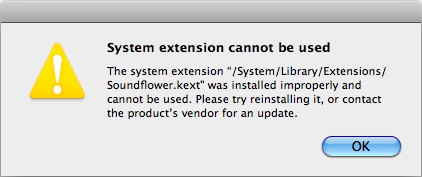
Periodically, a dialog box complaining about Soundflower.kext popped up:

soundflower-kext-error.png

I had Soundflower 1.4.3 installed, which was the most recent release before Snow Leopard was released. Now, Soundflower 1.5.1 is available, so I upgraded to it. This appears to be sufficient to get it working again, too.

Oh, the agony …

At this point, my system appeared to be stable enough to use — no spurious errors being logged to /var/log/system.log and no more annoying hangs. I’m sure I’ll discover a few more annoyances next week when I start dealing with work stuff again, but for now I can at least use the machine again.

Was the upgrade worth it? I guess I’ll find out.

Tags: , ,