Using a Cisco/Linksys WUSB600N on MacOS X 10.6

After getting totally fed up with the poor Wi-Fi range on my MacBook Pro, I picked up an external Cisco/Linksys WUSB600N. Of course, Linksys doesn’t provide Mac drivers for this product, but it’s a Ralink 2870 and Ralink provides drivers for MacOS X in their support section. I downloaded the RTUSB D2870-2.0.0.0 UI-2.0.0.0_2009_10_02.dmg driver (5.2 MB).

There is a driver inside USBWireless-10.6 for Snow Leopard, and it will complain during installation that the RT2870USBWirelessDriver.kext failed to install. This is expected, just ignore it, the installation will complete successfully.

At the time of this writing, the WUSB600N v2 isn’t included in the Info.plist for the kext, so I had to edit /System/Library/Extensions/RT2870USBWirelessDriver.kext/Contents/Info.plist in a text editor and add the appropriate bits. Search for “Linksys – RT2870 – 2″ and duplicate the <key> and <dict> elements, renaming the key to “Linksys – RT2870 – 3″ and the idProduct integer from “113″ to “121″. Here’s what it should look like after the changes:

        <key>Linksys - RT2870 - 3</key>
        <dict>
            <key>CFBundleIdentifier</key>
            <string>com.Ralink.driver.RT2870USBWirelessDriver</string>
            <key>IOClass</key>
            <string>RT2870USBWirelessDriver</string>
            <key>IOProviderClass</key>
            <string>IOUSBDevice</string>
            <key>idProduct</key>
            <integer>121</integer>
            <key>idVendor</key>
            <integer>5943</integer>
        </dict>

After making this change, unload/reload the kext or reboot your machine, and then plug in your WUSB600N and you should get a window popping up telling you that a new network device has been detected.

I hope this helps someone, as I was totally disappointed when I learned that Linksys wasn’t supporting this device on Mac “out of the box.”
Today’s moment of gift card FAIL

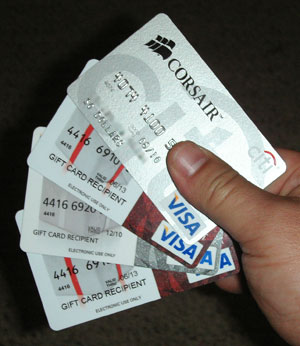
Over the last year, I’ve accumulated several “one-shot” Visa credit cards in the form of “gift cards” and manufacturer rebates. I decided today would be the day I’d try to spend some of these. I went to one of my favorite online shopping destinations, Amazon.com, picked out some items, and went to go pay with these cards. This should be no big deal, right? Right???

Handful of Visa cards.

So, I picked out an item that I couldn’t pay for with a single gift card. No problem, I’ll just tell Amazon to charge two of these cards and that would be that, right? Only, I discover that I can only choose one credit card to pay for the transaction. Ha, ha, this must be a joke, right? It’s 2009, you can’t expect me to believe that the company that basically pioneered e-commerce hasn’t figured out how to implement split billing?

Out of disappointment, I decided to locate the same item on Buy.com, where I discovered that they also only allow you to choose one credit card as payment. I did notice that both Amazon and Buy.com allow you to use multiple site-specific gift certificates to pay for an order, so I decided to work around the problem by ordering a Buy.com gift certificate for $50, the value of one of my Visa gift cards. I chose email fulfillment, figuring that I’d soon receive the necessary information by email to redeem my card and be done.

How can an e-product be “on backorder”?

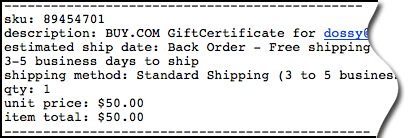
Estimated ship date: Back Order???

When I received my order confirmation email from Buy.com, this is what I saw. Try to appreciate the moment of WTF I experienced as I tried to believe what I was reading. An emailed gift certificate was on back-order??! Are you kidding me? What, did they run out of electrons or bytes in the warehouse?

I tried to attribute this to some bug in their order confirmation email process, so I waited for an hour for a second email, which would never arrive, containing the gift certificate. Finally, I gave up and went back to Buy.com and cancelled my order.

Does Amazon.com do any better? I’m not sure. I just noticed this fine print on their gift certificate order page:

* Note: For security purposes, e-mail gift cards and printable gift cards may go under a 24-hour review process while payment information is verified.

I don’t know what to do, at this point. Have any of you been in this situation, trying to make a purchase using multiple credit cards? Should I just bite the bullet and purchase these Amazon.com gift certificates and wait 24 hours? Are there any better solutions? Please, help me out, leave me a comment with your best suggestions.

Terence Eden doesn’t understand the point of OAuth

This morning, my friend Marjolein Hoekstra (aka @CleverClogs) brings this blog entry by Terence Eden to my attention. In it, he suggests that Twitter’s OAuth is a “gaping security hole,” but what he really illuminates is that he totally does not understand the point of OAuth. Let me try and explain:

In the bad old days of Twitter only allowing HTTP Basic authentication, in order for third-party applications to access your Twitter account, you had to hand out your username and password. While this “worked” it wasn’t ideal. Why? Well, any time you changed your password — either to prevent an application from continuing to have access to your account, or out of good “security hygiene” practices of regularly changing your password — you had to go back to every application that you wanted to continue to work on your behalf. If you use more than a few applications, this quickly became a tedious process as you can imagine. Again, this was less than ideal.

Eventually, Twitter rolls out OAuth, an open implementation of a cross-service authorization scheme. Each application now requests authorization to act on a user’s behalf, and such access is now manageable per application rather than an all-or-nothing as it were with HTTP Basic auth. This is a huge win as this decouples the user’s Twitter credentials from a third-party application’s privileges to act on behalf of that user. You can now change your Twitter password to maintain good security hygiene without the inconvenience of having to update every third-party application with your new password. You can now revoke access from a single application without having to, again, update every other third-party application with your new password.

Terence, sadly, mistakes this radical improvement as a defect and a security flaw. What’s truly sad is that Terence even knows about the Twitter OAuth Connections page where one can de-authorize individual applications, yet he still missed the whole point and benefit of OAuth in the first place. How?

He suggests that “Changing a password should – in the minds of most people – mean that you need to re-enter your password even if you have previously authenticated yourself.” Is this true? Is this what “most people” (that means YOU) think? Please, let me know in the comments below if this is truly the case when you authorize an application using Twitter’s OAuth. If this is true, then the problem still isn’t what Terence suggests. It’s a matter of user education. Read this entry again and absorb the goodness that OAuth provides over HTTP Basic auth. for third-party applications. Do not fall victim to Terence’s FUD.