Someone asked if there was a plugin for displaying the character count of the current message in a Pidgin chat window’s input widget, which would be useful when using Twitter via IM, to know if you’re going over the 140 character limit. I looked things over and came up with this simple plugin after about two hours of hacking … it places the current character count on the right-hand side of the GtkIMHtmlToolbar:
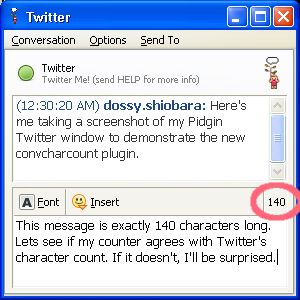
I’m inclding the new plugin’s source as a diff/patch to the Pidgin source, and a pre-built DLL binary for Win32:
- pidgin-convcharcount-plugin-patch.txt (Source)
- convcharcount-2.2.2.zip (Win32)
For those of you on Win32, just unzip the .zip file into your C:\Program Files\Pidgin\plugins directory. Then, go into your Buddy List window and select “Tools -> Plugins,” then click the checkbox next to “Conv. input chars count“. That’s it!
Let me know what you think of the plugin. Thanks!
UPDATE: I’ve finally gotten around to spinning a Debian 4.0 etch .deb for i386. If you’re on Debian, give it a try.
UPDATE: I’ve also spun a Fedora 8 RPM for i386.
Tags: Pidgin, Twitter, instant messaging, plugin
 Programmer, husband, father, singer, guitarist, tinkerer, reverse engineer, strange, and living in New Jersey.
Good stuff Dossy, thanks. (Yeah, it’s /that/ UG from #efnet.)
Plugin not work anymore.Pidgin 2.7.5
I just compiled it for Pidgin 2.7.7 (latest version at the time of writing) and the plugin works fine.
Thanks so much, this is exactly what I was looking for for posting tweets through Identica’s Google Talk bot.
Very cool. Perfect for twitter and texting cell phones.
This is awesome! Works fine with no problems.
But can you make another plugin that when typing a “/” command, change your regular text to text like this?
αв¢∂єƒgнιנкℓмησρqяѕтυνωχуz
(e.g. “/text blablabla” becomes вℓαвℓαвℓα to whoever you’re talking to)
thanks
I also use it and am quite happy with it. If you want to do more coding I would have some ideas:
a) Warn the user, if there are more characters or maybe also less than 4 characters before send is accepted
b) The web interface if identi.ca shortes the URLs which this can not do. Maybe this is place for a second plugin that might already exist?
c) If I want to reply to a message there is yet no easy way to do this. If i copy and paste a user name it has an URL in it.
Works like a charm. This is one of those things that you know you wanted, but didn’t expect. Thanks for making Pidgin more valuable!
Working on Ubuntu karmic 9.10. Thanks!
Thanks for your plugin! I am using with Pidgin on Vista 64 to send and recieve to/from identi.ca (Twitter alternative) using XMPP. For my eyes showing the count a bit larger would be nice.
Again, thanks!
Still a fantastic and useful plugin–one I can’t do without. Thanks!
Winner!!!! Thank you! Tweet.im should officially sponsor you!
Greets from the future :) Just found this page after getting lots of “error sending status” messages from trying to post oversized messages to Twitter in Pidgin via microblog-purple plugin. Does the job wonderfully! thanks :)
Hi. It’s very useful plugin, but now downloadable links are dead. I can’t find .zip or .deb(I’m going to using on Ubuntu) file of this plugin. Can u upload this plugin somewhere and update links please.
Thx :)
What on earth am I supposed to do with a text file? I’m not a programmer, but apparently everyone else on here seems to be.