Someone asked if there was a plugin for displaying the character count of the current message in a Pidgin chat window’s input widget, which would be useful when using Twitter via IM, to know if you’re going over the 140 character limit. I looked things over and came up with this simple plugin after about two hours of hacking … it places the current character count on the right-hand side of the GtkIMHtmlToolbar:
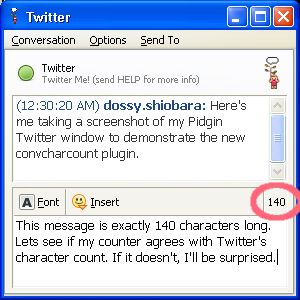
I’m inclding the new plugin’s source as a diff/patch to the Pidgin source, and a pre-built DLL binary for Win32:
- pidgin-convcharcount-plugin-patch.txt (Source)
- convcharcount-2.2.2.zip (Win32)
For those of you on Win32, just unzip the .zip file into your C:\Program Files\Pidgin\plugins directory. Then, go into your Buddy List window and select “Tools -> Plugins,” then click the checkbox next to “Conv. input chars count“. That’s it!
Let me know what you think of the plugin. Thanks!
UPDATE: I’ve finally gotten around to spinning a Debian 4.0 etch .deb for i386. If you’re on Debian, give it a try.
UPDATE: I’ve also spun a Fedora 8 RPM for i386.
Tags: Pidgin, Twitter, instant messaging, plugin






 Programmer, husband, father, singer, guitarist, tinkerer, reverse engineer, strange, and living in New Jersey.
Latest comments