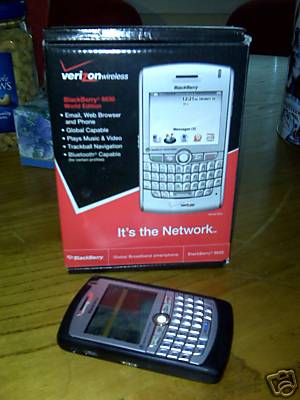
Selling a BlackBerry 8830 World Edition Verizon phone on eBay

I’m selling a BlackBerry 8830 World Edition Verizon phone on eBay for a friend. The auction will end next Friday, February 22nd. If you’re interested in it or know someone who is, please go and bid on it.

BlackBerry 8830 World Edition Verizon phone

Life is sweeter with the ‘Berry

After not being able to get data services on my Treo 650 last week, I finally had enough. It was over two years old and I was eligible for an “upgrade.” It was time to say goodbye to Palm and its aging hardware and operating system and move on to something more modern … or at least, switch to a product from a company that’s a little more commercially viable. I considered the Apple iPhone, but just can’t bring myself to pay the ridiculous “Apple Tax”–the extra money you pay for Apple’s fancy design. When a carrier offers the iPhone for $99, I might consider them.

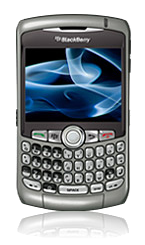
Blackberry Curve 8310

What at&t was offering for $99 this time around was the Blackberry Curve 8310 [at Amazon]. So, on February 4th, my wife and I went to the Willowbrook Mall at&t store and bought them. I also picked up an Aliph Jawbone [at Amazon] Bluetooth headset for myself and she chose the Motorola H12 [at Newegg] Bluetooth headset. We could have saved some money ordering it all online, but there’s something to be said for immediate gratification, being able to walk out of the store an hour or two later with everything just working. However, I did end up ordering two Sandisk 4GB MicroSDHC memory cards for the phones from Amazon.

I’m not going to try and do a full review of these products as there are already plenty out there if you search for them. What I will do is list the things that I discovered, especially stuff that surprised or disappointed me. It’s going to be completely subjective and folks may not agree with what I point out as being important, but they’re important to me.

(1) The 8310 has GPS which is very cool, but TeleNav’s service is $9.99/mo for unlimited routes. Ouch. Still, the software and service seems excellent so far and it’s still cheaper and more convenient than buying a dedicated GPS unit.

(2) The 8310 has GPS while the 8320 has 802.11b/g Wi-Fi. Yeah, I really would have liked my new phone to have Wi-Fi, but in reality, having GPS will be far more useful for me.

(3) The Blackberry OS 4.2 that currently ships with the device doesn’t let you record video. Luckily, RIM is working on their next upgrade, OS 4.5 (formerly referred to as OS 4.3.1, apparently renumbered by marketing) that will. I just hope they don’t keep slipping the anticipated release date over and over. Anyone know how to get into their beta program? I’d love to play with the beta release.

(4) Even though the 8310 has GPS, it appears that pictures taken with its camera do not store the GPS location in the image’s EXIF data. Again, not a big deal but something that I had expected and it not being implemented surprised me.

(5) The push-email sync. delay is a lot longer than I expected. My guess is that the Blackberry Internet Service doesn’t poll my IMAP mailboxes as frequently as I’d hoped, because even manually performing a “Reconcile Now” doesn’t seem to help. I’m guessing they only poll every 10-20 minutes which isn’t that bad, but not having a proper manual “sync now” that triggers the back-end poll is a let-down.

(6) When paired with a Bluetooth headset, answering the call with the green phone button defaults to the headset. I expected that answering the call by pressing a button on the phone would default to activating the handset. If I wanted to answer the call on my headset, I would have used the headset to pick up the call. This matters because I often have my phone in my pocket but leave my Bluetooth headset in my jacket pocket; I only wear it when I’m actually out and about. So, when I receive a call, I’ll grab my phone and answer it but the phone sends the call to the headset–argh! I then have to hit the menu button and select “Activate handset”, or press the $/Speaker button to use speakerphone, to actually talk on the phone. At the very least, this needs to be a configurable option in the phone application, whether to answer the call using the Bluetooth headset or on the handset.

(7) The Jawbone is an awesome headset. The noise cancellation really works well. It’s really comfortable to wear; it feels lighter on the ear than it actually is. But, it’s butt-ugly. I mean, it’s embarassing to wear this thing in public, it’s so ugly. When you buy the Jawbone, you’re definitely not buying it for the looks, that’s for sure. But, if you spend a lot of time talking on your cellphone, especially in public places or, like me, in the car with the window open, this headset will not let you down.

(8) On the other extreme, the Motorola H12 is gorgeous. It is small, lightweight and aesthetically pleasing. Even the charging base looks great on a desk and the use of magnets to attach the headset to the charging contacts on the base make my inner geek go “squee!” The sound cancellation on the H12 is adequate, but I’m not convinced it’s nearly as good as the Jawbone. However, where the H12 falls short in technical quality compared to the Jawbone, it more than makes up for it in sexy. I’m actually tempted to return my Jawbone in exchange for another H12, for just this reason.

That’s it for now. I’m anxiously awaiting the Blackberry OS 4.5 and what improvements it will bring. I’ll post an update once it arrives.

Do you have a Blackberry? Have any tips for me? Your favorite applications that you think I might enjoy? Any cool undocumented features or shortcuts that you’d like to share? Please tell me about them in the comments here.

Tags: , , , , ,

Covering large areas with some Linksys WRT54GS’es and DD-WRT

I recently helped a friend of a friend with a wireless networking setup who has a Seriously Large House–we’re talking easily 10,000 sq. ft. per floor, and the house has 3 floors. Yeah, it’s that big. They had set up a Linksys WRT54G and two WRE54G repeaters and, no surprise, had horrible signal coverage and frequent packet loss, and this was just trying to provide connectivity to a single floor in the house. Needless to say, they were not pleased, so I was invited to take a look and fix things.

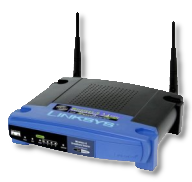
I’ve always heard good things about the third-party firmware DD-WRT, so I decided to give it a shot. I picked up two WRT54GS routers ($70 at Amazon.com) and installed DD-WRT on them. I also installed DD-WRT on the WRT54G they already had.

Oh, a word of advice–if you recall, I bought one of those WRE54G’s back in May 2007–don’t waste your money on them. They cost more than the WRT54GS, can’t run DD-WRT as far as I know, and they only have one antenna, which means losing half your bandwidth per repeater hop. There’s absolutely no reason to  use them, whatsoever–unless you’re not willing to figure out DD-WRT, of course.

Linksys WRT54GS

So, I configured one WRT54GS as the master which has the WAN uplink providing network access to the wi-fi cloud. The remaining WRT54GS and WRT54G were configured as repeater bridges, all with the same SSID to facilitate roaming which worked perfectly–only one (!) packet dropped when roaming between AP’s. I did crank the power up from the default 28mW to 60mW which made a significant difference in signal range and coverage.

With this, there’s reasonable coverage on the first floor, but most importantly full coverage on the second floor which is where they were most interested in. The third floor gets good signal strengh in spots, but that’s adequate for now.

Overall, for the price, the Linksys WRT54GS is a fantastic product and when used with DD-WRT, can be used qutie effectively.

Life after a week of Cablevision/Optimum Online

After living with 384 Kbps SDSL for the past eight years, first with NorthPoint until they went out of business (1999–2001), then with Eclipse Internet Access (2001–2003) who was acquired by NetCarrier in early 2001, then to DSL.net who I’m still with today. Each time, I’ve been stuck with only 384 Kbps SDSL because every time we’ve moved, we’ve picked locations that are close to the end of the DSL physical limit–roughly 10,000-15,000 ft. from the telco.

The last time we moved back in 2001, I tried ordering Cablevision/Optimum Online. They gave me an install window of “sometime between 8 AM and 2 PM” which was pretty ridiculous, but whatever. By 1:30 PM, when no one showed up, we called to get a status update. We were told that they would contact the technician and get back to us within 30 minutes. At 2:00 PM, we hadn’t heard back so we called again to be told that they were on their way. By 3:00 PM, we had enough waiting and had other things to do that day, so we called back and cancelled the installation order. We left the house and did what we needed to do and came back around 4:00 PM. At 4:30 PM, the installer rolls up and I met him outside to ask, “Didn’t anyone tell you the install order was cancelled over an hour and a half ago? You realize our install was scheduled for before 2 PM.” He shook his head “no,” and I sent him away. The guy showed up in a pickup truck without a ladder or a bucket truck, which was necessary for our install anyway–how was he even going to complete the install even if he did arrive on time? We subsequently ordered DirecTV satellite for our TV service and I ordered the SDSL, and that was that.

So, we put up with our slow SDSL for so long because it has been really stable–I’d say close to 99.99% uptime or less than one hour of downtime per year! It was also business-level service with static IPs and I could host my own servers off the link as part of the agreement. Other than the speed, I was and still am very happy with the service. But, it would be nice to get more bandwidth, so I reconsidered doing cable broadband. Things couldn’t be as bad as they were 8 years ago, could they?

Fast-forward to last week, January 16th, to our Cablevision install date. I ordered Optimum Online for business with Boost and Static IP. The install window this time was “sometime between 11 AM and 2 PM.” Again, at 1:30 PM, there was no installer in sight, so I called to ask for status. I was called back and told that he was running late. He finally showed up close to 3:00 PM, but at least he had come with a ladder to get up the pole and do the outside wiring required. Around 5:30 PM, he’d completed the installation and everything was up and running. Not the greatest experience, but this time I at least had low enough expectations that unless they didn’t show up at all on the day of the install date, I wasn’t too bothered.

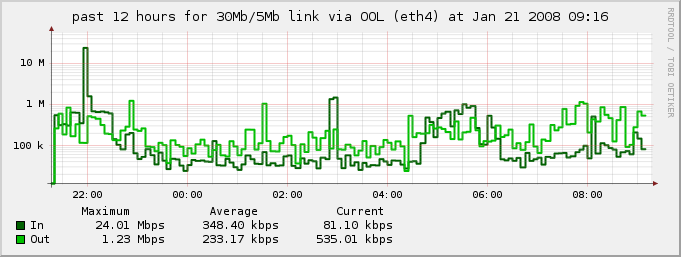
Over the next few days, I’d cut over DNS and mail and web over to the new static IP range I was assigned. After two days, the old DSL link went quiet indicating all changes had propagated. I’d set up bandwidth accounting to get an idea of how well the new cable link was doing. Here’s a snapshot of the graph from a recent time period:

rrd graph of 30Mbps/5Mbps Optimum Online link, from 2008-01-21
(click to enlarge)

The link is advertised as being close to 30 Mbps down and 5 Mbps up, and as you can see, the max the link saw over the past 12 hours in that graph was 24 Mbps down and 1.23 Mbps up–fantastic throughput, for sure. My laptop, connected to my network via wireless 802.11g at 54 Mbps, seems to get 5.0 Mbps down and 4.6 Mbps up using Cablevision’s SpeedCheck. Those numbers are a bit misleading as they only reflect speeds over your cable modem into their network–speed tests to sites on the open Internet come out noticably lower, probably due to Cablevision’s peering speeds or some other rate limiting or traffic shaping they have in place, would be my guess. Still, this is a far cry better than the 384 Kbps SDSL, right?

One thing I noticed about cable is the incredible amount of ARP chatter that comes down the pipe. My guess is there isn’t enough to materially affect the amount of available remaining bandwidth, but it’s interesting to see that kind of leakage. Another thing is the latency: on the SDSL link, latency was almost always ~20 ms, whereas on the cable link it fluctuates between ~20ms to as high as ~80 ms at times. While this probably isn’t noticed by your typical customer, I wonder how much jitter it causes on realtime applications such as VoIP or interactive SSH sessions. I guess I’ll just have to see.

All in all, I’m happy with the new cable link and will likely be shutting down the SDSL or keeping it as a backup if DSL.net will make me a great deal as it’s quite costly (around $130/month). Relying completely on the cable link makes me extremely uncomfortable, but the cost saving and additional bandwidth certainly makes it attractive. We’ll see how reliable this link over the next few months, as I’ve got the link monitored and bandwidth accounting set up, etc.

Tags: , ,

Santa brought us a Wii for Giftmas 2007

Wii logo

Somehow, Santa managed to score us a Nintendo Wii for Giftmas this year. Hopefully, this will eventually replace our PlayStation 2, once we build up a reasonable collection of games.

I have to admit, the last Nintendo-based gaming product I’ve owned was the Super NES. I passed on the GameBoy family of products, the GameCube, and the DS. But, the Wii … something about it just smelled of old-fashioned Nintendo charm … gameplay that was really fun again, not like these annoying reflex-based twitch games that are so popular today.

The games we’ve tried so far: Super Paper Mario and Wii Play. I was hoping that Super Paper Mario was more like the original Super Mario Bros. game from the NES days, but it’s pace is heavily punctuated by the cute storyline. I don’t know if I’ll be able to get into it.

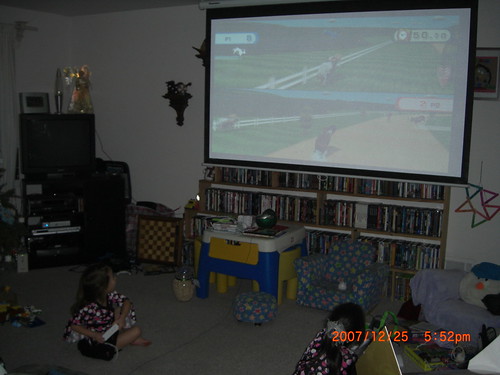
On the other hand, Wii Play was a hit the moment we started. Both of my girls, ages 7 and 4, study horseback riding, so the “Charge!” game was the natural first choice to try. They quickly figured out the mechanics of how to hold and manipulate their Wii remotes and had a blast! The rest of the Wii Play games were fun, but some were a bit difficult to play given our setup. Let me explain with a picture:

The girls playing Wii Play 'Charge!

That’s our living room. That’s a 87″x65″ projection screen that they’re playing on. The little sensor bar is sitting on that Little Tykes table, below the screen. The sensor bar is, what, maybe 24″ wide? Perhaps there’s a setting I can adjust more than “above or below the screen” (which I’ve already set to “below”), but pointing at a location on the screen doesn’t work right. Still, playing on the big screen makes for an awesome Wii experience, I have to admit.

I have to say, Nintendo has really done well with the Wii. It’s definitely the kind of gaming console that reminds me of my childhood, growing up with the original NES. I’m glad I can share that experience with my chidlren.

Tags: ,

My LOLbiznes cards have arrived!

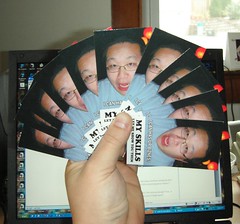
I ordered my LOLbiznes cards on November 25, and they arrived yesterday on December 3, a day ahead of schedule.

My LOLbiznes cards, let me show you them

I compared two companies, VistaPrint and PrintsMadeEasy.com. I decided to order from PrintsMadeEasy.com, since they offered smaller quantities and I was just experimenting with this batch of cards, so I didn’t want to spend a lot of money, overall.

For cheap on-demand printing at low quantities of personal cards, the cards from PrintsMadeEasy.com came out fine. Some cards–I’d guess, maybe 1 in 10 or so–didn’t print properly, with toner not adhering to the card stock properly or other visual defects. The color profile of their printer is a bit too heavy on the magenta as the front-side art is a lot more purple-tinted than it should have been. The cards are good enough, but if you’re looking for perfection, this isn’t it.

I placed the order on Nov. 25 and it arrived Dec. 3, or eight days later. The guaranteed delivery was by Dec. 4. For 100 glossy, double-sided business cards, it cost $19.99 and $6.95 for shipping and handling, for a total of $26.94. Uploading my own design for the front and back was included, free. The net cost per card is $0.27 each.

Compare this to VistaPrint, whose minimum quantity is 250 cards for $19.99, and they charge $4.99 per uploaded design, plus $9.99 more for glossy finish, and $6.99 for double-sided: $46.95 total. Add $9.15 for 14-day shipping, and you’re talking $56.10, or a cost of $0.22 per card.

Generally, folks order in larger quantities, typically 1,000 at a time, so lets compare those prices. VistaPrint: $71.95 + $11.15 S&H = $83.10 or $0.083 per card. PrintsMadeEasy.com: $79.99 + $8.85 S&H = $88.84 or $0.089 per card.

Costs aside, both sites provide reasonable web interfaces for uploading your own designs and preparing your order. PrintsMadeEasy.com uses a Flash-based interface which I really dislike, but it does work and I was able to complete my order using it. No real surprises here.

In the end, I would certainly order from PrintsMadeEasy.com again for small quantity orders just to test out new designs, but I do want to give VistaPrint a try just to compare the print quality difference. If they can deliver better quality, I would definitely use them for larger quantity jobs, where the price difference becomes negligible.

Have you ordered cards from VistaPrint? How did they come out? Or, do you have any other on-demand business card printing companies to recommend? Let me know about them in the comments. Thanks!

Tags: , , , ,

I CAN HAS A BIZNES CARD

The last time I had business cards printed was back around 1995. I think I ordered a box of 250 cards, ended up giving out maybe 100 at most, and used the rest as scrap paper for disposable notes on my desk. Since then, I haven’t bothered to order updated business cards as I’ve changed phone numbers, addresses or jobs.

Recently, though, I’ve been asked by people if I have a business card often enough that saying “no” has become a pattern. Just last night, I went out to dinner with my family, and while outside smoking a cigarette, I started chatting with another patron who was doing the same. Turns out he also works a tech. job and asked me for my card. I ended up jotting down my contact information on a card for the restaurant and handed it to him.

In the past, this wouldn’t have mattered to me. But, now that I’m consulting full-time, these quick introductions could turn into valuable business leads that I could really use, now. The lack of preparedness and professionalism isn’t going to give that prospective client the sense of confidence I want them to have in my abilities and overall product.

So, last night I decided I was going to design and order myself a set of business cards. I wanted to create a card that was unusual, humorous, unique and memorable–qualities that reflect my nature and approach. The front of the card borrows from the LOLcats meme, as well as the “let me show you them” meme. I have yet to hear of anyone else making semi-serious LOLbusiness cards, so let me be the first. (FIRST!)

The back of the card is simple, informative and efficient–qualities that represent the kind of work I perform. I list my name, a title and contact information with as little clutter as possible. I use the remaining space to list popular technologies (think: keyword stuffing) that I don’t mind taking on work doing. I list AOLserver and Tcl at the top because as the recipient quickly scans down the list, they should cause a hesitation and very likely a question like “what are AOLserver and Tcl” which give me the opportunity to explain them, rather than coming across as pushing them directly.

In case you’re wondering, here’s what the proofs of the card look like, showing front and back:

Dossy's LOLbusiness card, frontDossy's LOLbusiness card, back

In theory, the order I placed online today should be arriving sometime during the first week of December. When I get them, I might write a little something about where I ordered them.

So, what do you think of the cards? Too edgy? Too risky? Not serious enough? Fun, or funny? Would you give me your business if I handed you one of these cards?

Tags: , , ,

Glade’s “Angel Whispers” candle scent makes me happy

I don’t know what it is, but these Glade “Angel Whispers” candles have a scent that really makes me happy. It’s a sweet smell and not overly flowery: I don’t like scents that smell primarily of flowers. It’s a very mellow scent: the kind that doesn’t really get stronger the longer you leave the candle burning, which can really become overpowering.

Here’s a quick picture of the candle that’s currently burning on my desk:

Glade 'Angel Whispers' candle

Tags: , , ,

It all makes perfect sense …

“Can’t you see?
It all makes perfect sense
Expressed in dollars and cents,
Pounds, shillings and pence.
Can’t you see?
It all makes perfect sense.”

– Roger Waters, Perfect Sense, Part II Roger Waters - Amused to Death - Perfect Sense, Pt. 2

Roger Waters at the Continental Airlines Arena, May 24th

Last night, I was able to see Roger Waters perform live at the Continental Airlines Arena in East Rutherford, New Jersey. If you don’t recognize the name, he’s the voice you probably recognize when you listen to Pink Floyd songs.

I’d continued to follow him during his solo career and fell in love with the Perfect Sense song I quoted above, but when the tickets said “Dark Side of the Moon,” I was expecting only Pink Floyd material. But when he finally played the song, I was in my happy place. They could have played boy band covers for the rest of the evening for all I cared; I was fully satisfied.

Another treat was hearing a song he’d written recently called Leaving Beirut, which is so full of emotion that it left me incredibly sad and angry afterwards. But, it also filled me with joy and happiness, because it also meant that there are still people who understand what caring about others and sharing what (little) you might have can do to make life just that much more bearable. Roger does his part by sharing this narrative with us.

Inside the Arena, looking at the stage from Section 127

It was a fantastic concert and the place was almost packed. The hum and buzz and energy was very palpable. When we left, sometime close to 11 PM, I was more energized than when I’d gotten there at 7:00 PM. This was exactly the kind of de-stressing I needed after the last two weeks and everything that’s been going on.

Thank you, everyone who made last night possible, especially the person who was kind enough to get us these tickets!

Links:

  • Perfect Sense, Part II: Roger Waters - Amused to Death - Perfect Sense, Pt. 2
  • Leaving Beiruit: lyrics, Roger Waters - To Kill The Child / Leaving Beirut - Single - Leaving Beirut

Tags: , , , , ,

Lots of miles on our Bosch WFK2401UC washer motor

(Disclaimer: I’m not an appliance repair technician, just a homeowner with an expensive appliance.)

We have a pair of stacked Bosch washer and dryer appliances, the WFK2401UC and the WTL5400UC. They weren’t cheap when we bought them, and now five years later, the washer motor gave out. Here’s what the back of the washer looks like, with the motor already removed:

Bosch WFK2401UC inside, without motor

It fills with water and drains just fine–it just doesn’t turn the drum and agitate. The drum rotates smoothly so the bearings don’t appear to be worn. The belt is in good condition. My guess: the brushes on the motor are worn. Here’s the motor before I started disassembling it:

Bosch WFK2401UC motor, PN 141860

After carefully taking the motor assembly apart, I was able to get the carbon brush holders out. Taking the connecting lead off the cap and sliding the brush out, here’s what one of my worn brushes looks like:

Bosch worn carbon brush, PN 154740

See that rectangular chunk on the left-hand side? That is what’s left of the carbon brush–it starts out close to 1.5 inches long! From what I can tell, the measurements of the brush are 3/16″ (0.1875″) x 0.5 ” x 1.5″.

Armed with this information in hand, I decided to source replacement parts locally. This was an exercise in failure: none of the appliance repair places have much in the way of Bosch replacement parts nearby. I also tried to get my hands on car alternator brushes which I’d have to cut and file to fit–no such luck. I even went to Carbone-Lorraine down in Boonton, NJ, to see if they had anything in stock that I could use as a start–they wanted to fabricate them for me, in two weeks. Defeated, I gave in and decided to get replacement parts from Bosch. Of course, I knew this meant paying a lot of money for what should be a $5 part.

After a little bit of searching around, I found Marcone Appliance Parts which had these parts in stock! As I expected, the price for a set of two carbon brushes was close to $30, instead of the $5 they ought to cost. But, it sure beats spending another $1,000-$1,500 on a new washer, right? So, I bit the bullet and placed an order which should hopefully arrive tomorrow or the next day.

In case you want to order them, here’s the information you’ll need:

If you need to order the whole motor assembly, you can get that too for just under $200:

If you’re a proud (or perhaps disgruntled) owner of a Bosch WFK2401UC washer, and it’s lost its magic smoke … perhaps this information will help you if you choose to repair it yourself–but if you do, remember to take all necessary precautions to ensure your safety, I’m not responsible for anything you do, etc., etc.

I’ll post an update once I’ve received the new brushes and installed them. I’m hoping this is all that’s wrong with the washer and we’ll be back to doing laundry in no time.

Update: The new brushes arrived today, May 22nd, and I installed them and reassembled the motor. Here’s a picture of the brand new brushes:

New Bosch carbon brushes, PN 154740

I had to experiment a bit with how the motor was mounted with respect to the belt tension, and it seemed to not be able to spin the motor at its full speed. I ended up removing the motor to inspect it and when I reinstalled it, I must have done something wrong because it made some really bad sounds and then shot an electrical arc which tripped the circuit breaker. I was afraid I’d let the magic smoke out of the appliance, but it seems to power up after resetting the breaker. I hope I can figure out why it’s not working properly before I do completely destroy this machine. :-)

Update: Saul has kindly shared the PDF for the owner’s manual (16.1 MB PDF) (mirror).

Update 2010-09-23: After much searching and not finding, I scanned the Use & Care Manual for the WTA3500 and WTL5400 electric dryers (1 MB PDF). I did find the installation guide (537 KB PDF) too, which I also uploaded.

Tags: , , ,